
The smenso project software offers comprehensive task management that helps project teams organize, track, and complete their work efficiently. This specification describes the wide range of smenso features that simplify task management.
Group tasks
smenso allows you to group tasks to increase clarity and bundle related tasks. By grouping, teams can break projects down into smaller, more manageable parts.
What is a task?
A task in smenso is a defined unit of work that is assigned to specific people and should be completed within a given timeframe. Each task can include detailed information, attachments, and dependencies.
Create folders
With smenso, users can create folders to organize tasks by topic or project area. This structure helps improve clarity and makes it easier to access related tasks.
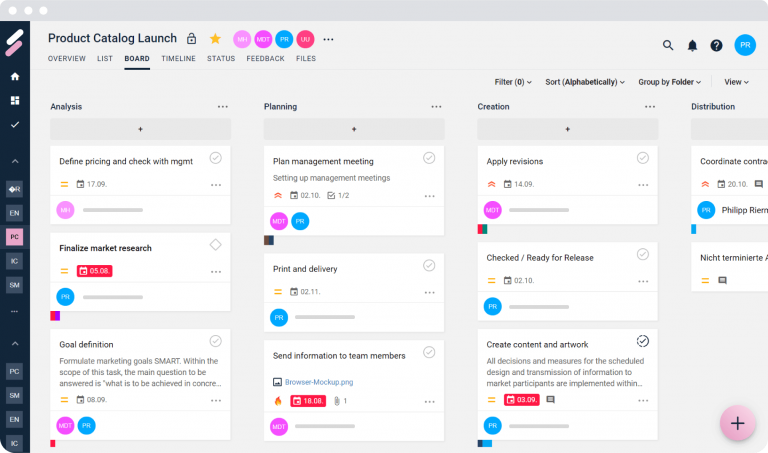
Task cards in the board view
In the board view, tasks are displayed as cards that can be easily moved to visualize progress. This view supports agile work and helps keep track of the current status of tasks.
Tasks in the list view
The list view provides a detailed, tabular representation of all tasks. This view is ideal for systematic processing and allows quick sorting and filtering of tasks.
Tasks in the timeline view
The timeline view displays tasks in chronological order. This view helps to keep an eye on deadlines and plan the temporal progression of projects.
Tasks in the Gantt view
The Gantt view provides a graphical representation of tasks and their dependencies over the project duration. This view is particularly useful for long-term planning and managing complex projects.
Create and view tasks
Users can quickly and easily create and view new tasks in smenso. Each task can be enriched with detailed information, including description, due dates, priority, and assignee.
Task templates and default templates for folders
smenso enables the creation and use of task templates. These templates can be defined as the default for specific folders to manage recurring tasks efficiently.
Use sorting
Tasks in smenso can be sorted by various criteria such as due date, priority, or assignee. This feature makes it easier to prioritize and manage tasks.
Milestones
Milestones mark important points or goals within a project. smenso supports the definition and tracking of milestones to monitor a project’s progress.
Status and workflows
Tasks can go through various statuses that indicate progress. smenso allows you to create custom workflows that govern and automate status changes.
Approving status changes (workflow)
In smenso, status changes can be approved through defined workflows. This feature ensures that changes are only made by authorized individuals.
Activity stream in tasks
Every task in smenso includes an activity stream that documents all changes and comments related to the task. This ensures transparency and traceability within the project team.
Text editor and internal links
smenso provides a powerful text editor that makes it easy to edit task details. Users can use internal links in text fields to reference related tasks or documents.
Add files
Users can add files directly to tasks to consolidate all relevant documents in one place. This facilitates access to needed information and improves collaboration.
Planned/Actual fields in tasks
smenso enables capturing planned and actual data in tasks to compare real progress with planned targets and detect variances.
Subtasks and their management
Tasks in smenso can be divided into subtasks to represent more detailed workflows. Subtasks can be converted into main tasks and vice versa. They can also be assigned to different main tasks to enable flexible work structures.
Dependencies of subtasks and tasks
smenso supports defining dependencies between tasks and subtasks. This helps plan the sequence of steps and avoid bottlenecks.
Working with the list view
The list view enables simultaneous editing of multiple tasks. Users can filter, sort, and bulk-edit tasks to work more efficiently.
Restore deleted tasks
smenso provides the option to restore deleted tasks. This adds extra safety and flexibility to task management.
Multi-select and bulk processing in the list view
In the list view, users can select multiple tasks at once and perform bulk changes. This saves time and increases efficiency when handling large volumes of tasks.
Automatic alignment of start and due dates
smenso automatically aligns the start and due dates of tasks and subtasks to ensure consistent and realistic planning. This feature ensures that time-based dependencies and task order are correctly maintained.
Summary of benefits
Task management in smenso offers a wide range of features that help organize projects efficiently and clearly. Key benefits include:
- Comprehensive visualizations: With multiple views such as board, list, timeline, and Gantt, users can manage their tasks flexibly according to their needs.
- Efficient structuring: The ability to group tasks, create folders, and use task templates makes organizing and managing projects easier.
- Detailed task management: Features like creating and viewing tasks, milestones, statuses and workflows, and activity streams ensure thorough and transparent task tracking.
- Collaboration and communication: With the integrated text editor, internal links, file attachments, and the activity stream, teams can collaborate efficiently and share information.
- Flexibility and safety: Features such as restoring deleted tasks, multi-select and bulk processing, and the automatic alignment of start and due dates provide additional safety and flexibility in task management.
Conclusion
The smenso project software provides a powerful solution for comprehensive task management in projects. With its diverse features for structuring, visualizing, and managing tasks, smenso helps project teams organize their work efficiently, stay on top of things, and successfully complete projects.
Comments
0 comments
Please sign in to leave a comment.